
The Problem
For those of you who have dealt with the main C++ build system , CMake, you know that at times it can seem unintuitive. You may also wonder, why do I need to program my build system with this custom programming language? Most experienced programmers would say that building a domain specific language is almost always a bad idea, prior to the wide range of scripting languages, CMake‘s DSL was the better option. CMake using a DSL is the first problem, the second problem being; developing C++ application is already hard enough, why do we need to juggle another half-baked language with poor documentation? As a software developer, you’re already juggling multiple languages.
The third problem being, imagine that you’re the type of developer that wants to use external dependencies, i.e. most developers. Oh wait in C/C++ we manage our dependencies by either installing it globally (like old python) or you write one of these here….
CPMAddPackage(
  NAME termcolor
  GIT_REPOSITORY https://github.com/ikalnytskyi/termcolor
  GIT_TAG v2.1.0
  OPTIONS
  "BUILD_STATIC_LIBS ON"
)

target_link_libraries(${PROJECT_NAME} PRIVATE termcolor)
This block of code from CMake which instead of using FetchContent it’s using CPM which is basically a wrapper around FetchContent which aims to make it less bad. As stated on the CPM github
CPM.cmake is a cross-platform CMake script that adds dependency management capabilities to CMake. It’s built as a thin wrapper around CMake’s FetchContent module that adds version control, caching, a simple API and more.
https://github.com/cpm-cmake/CPM.cmake
Our Solution
We provide a wrapper around CMake that has no lock in, endless extensibility integrated package management, sane defaults. Along with this we also have a project template system which allows us to provide you an entire default project that you can also just run with one command.
🚀 frate new #Start a new project, -d for defaults
🛠️ frate build #Build your project, -j for multi-threading
🏃♂️ frate run #Run the project
📦 frate add p #Add a package, -l for latest version
🔍 frate search p #Search local cache for packages
🔄 frate update index #Update package index
🧹 frate clean #Clean your project, -c to also clear cache
👀 frate watch #Auto-build and run on file changes`
Project Templating
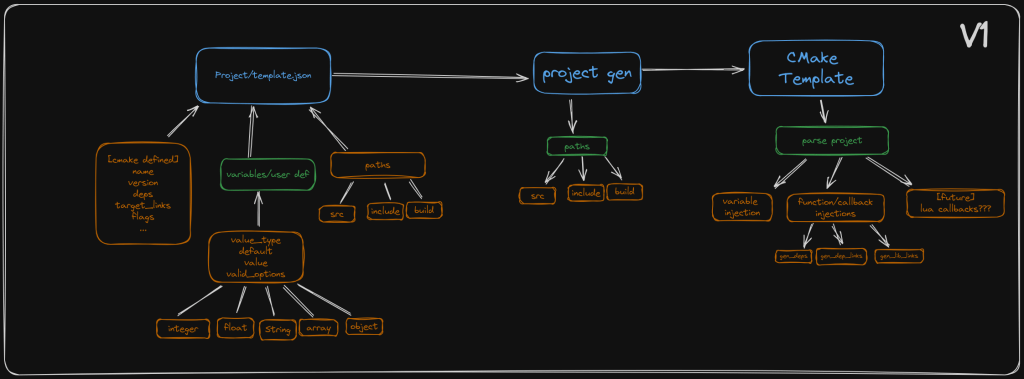
One of the design decisions we know we had to get right is how templating a project should work. We experimented with a couple different ideas, one being this one below.
Solution #1
our original idea was to define all the paths in the template config and generate the project one hundred percent
programatically. This quickly becomes pretty unmanageable and you want to have the ability have to endless extensibility. Some of the ideas from this sketch make it to the next round like the idea of user-defined data structures. The biggest feature that we provide is the ability to create lua macros to help generate the CMake file.
I guess it should be mentioned here that Template creators will be the only ones that would have to worry about this stuff. The end user developer would ideally never have to touch a line of CMake ever again.

Solution #2
After discussing solution one among ourselves and some of our supporters, we settled on this solution but this isn’t the last one…
This one brings in the lua macros into the mix and has a new rendering idea, any file with the extension .inja has the ability to use any lua macros defined along with project variables and project attributes. Then once the template file is rendered it removes the file extension from the .inja from the file
This is great and all but it still negates version control and the ability to have have shared code.
So it was decided that we go with a template management system(TMS if you want to sound cool) which would manage different versions of a template and this allows each project to be locked to a template hash, git url, and template name.
Solution #3
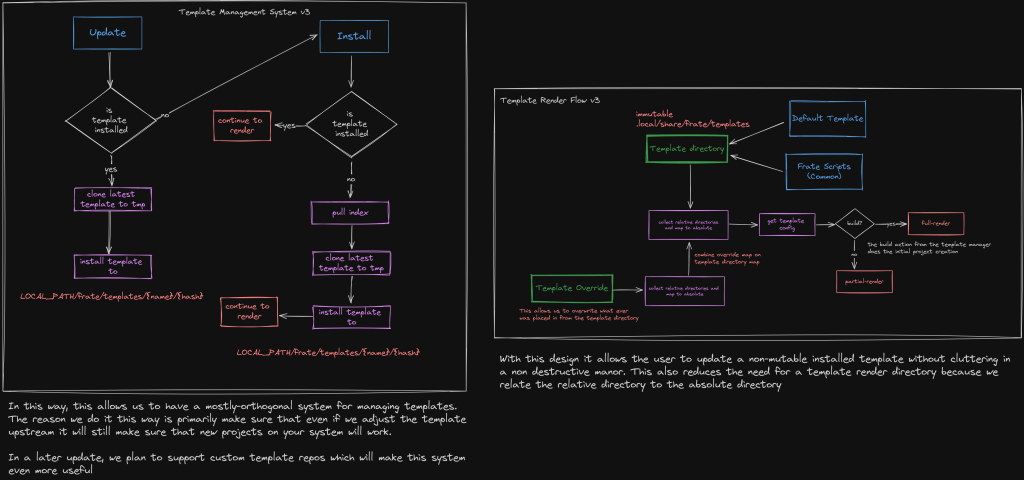
In solution three, the TMS and the template renderer are separate systems. As a side note, we also upgrade from rounded square boxes in excalidraw to square boxes, I hope you’re pleased…
Anway, the new renderer uses the TMS’s templates as a immutable reference to the template and an override system inside the users project which is totally optional. By default you have project modes, dependency management, and user defined variables(implemented by the template author).
The way the override system works is, once you add files to your override folder, it create a virtual project scope using the templates in your local directory.
Using a hashmap I was able to use the relative directory as a key for each file no matter whether it’s coming from the installed template directory or the override while also being additive.
Why Templating?
I think that using templates has the potential to please the most amount of developers. The people that still need to write CMake have the ability. The people that want to import their old projects and incrementally migrate to a more idiomatic frate project can theoretically. There is a lot to gain from using frate to develop your c++ projects. Features like project change watching, remote builds, license management, CPack Generation, and much more!
Final Thoughts
While this may not be a perfect solution and I do understand that there are tools that offer a layer of ease to c++ project management, we aim to create the most extensible while having sane defaults. Our mission is to create powerful tools and libraries to give c++ a fighting chance in the world which is growing up so fast around it.
If you would like to check out the project for yourself here is a link to the github. note: that it is still in a very early stage and there is still a lot of work to do.


 jmhart blog
Leave a comment